



You’ve built a beautiful Shopify store, but organic traffic remains frustratingly low. Despite Shopify’s built-in SEO features, many Australian e-commerce businesses struggle to rank on Google’s first page. The problem isn’t Shopify itself but rather the manual optimisation steps that most store owners overlook. This guide walks you through practical, actionable strategies to prepare, execute, and verify Shopify SEO improvements that genuinely boost your organic search performance and drive sales.
Table of Contents
- Key takeaways
- Understand Shopify’s default SEO and why manual optimisation matters
- Prepare your Shopify store for SEO success: tools and audits
- Execute effective Shopify SEO optimisation: manual fixes and best practices
- Verify and maintain your Shopify SEO: audits, monitoring, and troubleshooting
- Boost your Shopify SEO with expert support
- Frequently asked questions
Key Takeaways
| Point | Details |
|---|---|
| Shopify default gaps | Shopify handles core technical SEO but misses manual optimisation steps that boost rankings beyond the basics. |
| Manual optimisation matters | Manual optimisation matters because customised meta titles, descriptive image alt text, and correct canonical handling substantially improve search performance. |
| URL and title focus | Focus on URL handles and meta titles to target primary keywords and reduce potential traffic losses. |
| AU focused keyword tools | Use free Australian focused keyword tools and regular audits to identify opportunities and align content with local search trends. |
Understand Shopify’s default SEO and why manual optimisation matters
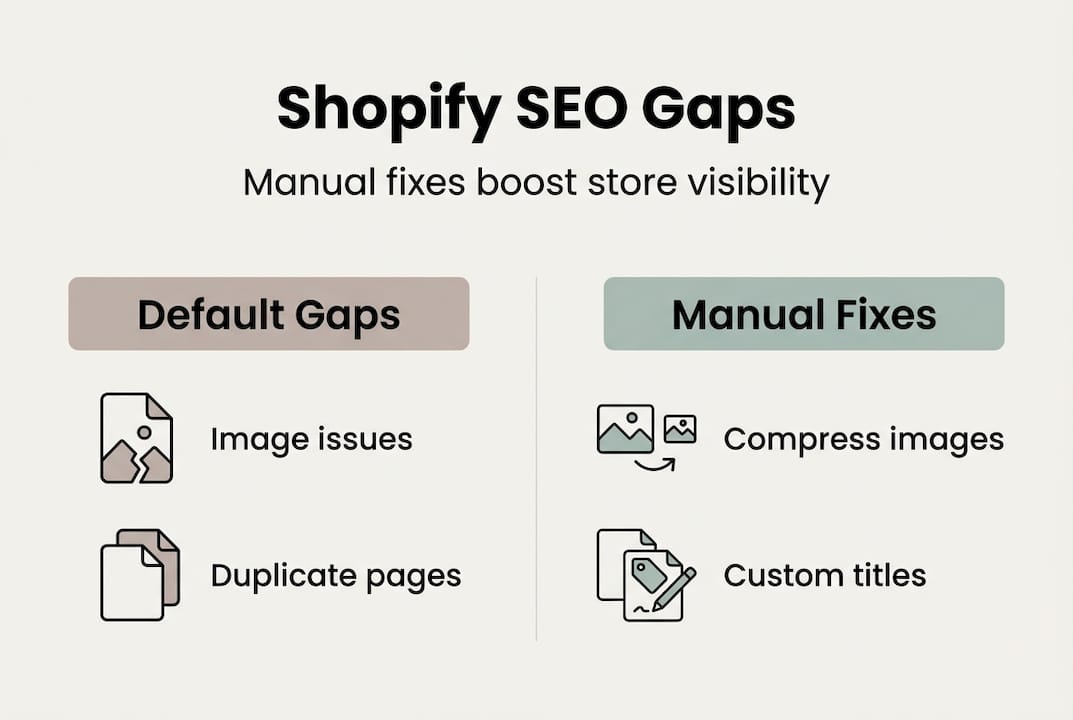
Shopify handles core technical SEO like HTTPS, sitemaps, robots.txt files, and canonical tags automatically. This gives you a solid foundation without touching code. However, this automation stops short of the nuanced optimisation that separates high-ranking stores from those buried on page five. Your default meta titles automatically append your store name, consuming 20 to 30 precious characters that could showcase compelling benefits or keywords. This seemingly minor detail directly impacts click-through rates, as searchers gravitate toward titles that promise clear value.
Image optimisation represents another critical gap. Shopify doesn’t compress images or add descriptive alt text automatically, leaving accessibility and ranking opportunities on the table. Product schema markup, which helps Google display rich snippets with pricing and reviews, requires manual implementation through apps or code. URL handles default to your product or collection names, which often contain unnecessary words or fail to target your primary keywords. Research shows that ignoring these manual optimisation areas can reduce potential organic traffic by over 40%, a massive loss for any e-commerce business.
Manual optimisation also addresses platform-specific quirks. Shopify’s collection pages can create duplicate content if products appear in multiple categories without proper canonical tags. JavaScript-rendered navigation elements may not be reliably crawled by search engines, hiding important internal links. App bloat from excessive third-party plugins slows page speed and damages Core Web Vitals scores, both ranking factors Google weighs heavily.
Pro Tip: Regularly review and customise your meta titles for better click-through rates. A well-crafted title that speaks directly to searcher intent can increase CTR by 20% or more, compounding your traffic gains over time.
Understanding these gaps empowers you to take control. The good news is that most fixes require no coding knowledge, just strategic thinking and consistent execution. By addressing what Shopify leaves to you, including SEO meta tags optimisation, you unlock the full potential of your store’s search visibility.
Prepare your Shopify store for SEO success: tools and audits
Before diving into optimisation, you need a clear picture of your store’s current SEO health. Start by performing a comprehensive SEO audit comparing your metrics to Shopify store benchmarks. This audit reveals technical issues, content gaps, and opportunities that might otherwise remain invisible. Focus on image file sizes, URL structures, meta title quality, broken internal links, and page load speeds. These elements directly influence both user experience and search engine rankings.
Google Keyword Planner remains one of the most powerful free tools available, especially when filtered for Australian search trends. This ensures you target keywords that local customers actually use, rather than generic international terms. Analyse search volumes, competition levels, and related keyword clusters to build a targeted content strategy. Pair this with Google Search Console to identify which queries already drive impressions but have low click-through rates, signalling opportunities for meta title and description improvements.
Your audit should also examine app bloat and script loading issues. Many Shopify stores accumulate apps over time, each adding JavaScript and CSS files that slow page rendering. Excessive scripts harm Core Web Vitals scores, particularly Largest Contentful Paint and Cumulative Layout Shift. Use tools like Google PageSpeed Insights to measure these metrics and identify specific scripts causing slowdowns. Removing unused apps and consolidating functionality can dramatically improve load times.
Create a prioritised list of technical issues based on their impact. High-priority items include broken links, missing alt text on key product images, duplicate content from faceted navigation, and pages blocked by robots.txt accidentally. Medium-priority tasks might involve optimising secondary category pages or improving internal linking structure. Low-priority items include minor formatting inconsistencies or non-essential page speed tweaks.
| Tool | Primary purpose | Key benefit for Shopify stores |
|---|---|---|
| Google Search Console | Performance tracking and indexation monitoring | Identifies crawl errors and ranking opportunities |
| Google Analytics | Traffic analysis and user behaviour insights | Reveals which pages convert and which need improvement |
| Google Keyword Planner | Keyword research with AU filters | Targets local search intent for Australian customers |
| Google PageSpeed Insights | Core Web Vitals measurement | Pinpoints specific speed issues harming rankings |
| Screaming Frog SEO Spider | Technical audit and broken link detection | Crawls entire site to surface hidden technical problems |
Pro Tip: Focus audits on metrics that directly impact user experience and rankings, such as load speed and crawl errors. Vanity metrics like domain authority or social shares matter far less than tangible technical issues affecting how Google crawls and ranks your pages.
With audit data in hand, you’re ready to tackle optimisation systematically. Document your findings in a spreadsheet, noting current status, target improvements, and expected impact. This preparation ensures you work strategically rather than randomly tweaking settings. Consider engaging professional SEO services if your audit reveals complex technical issues beyond your expertise.
Execute effective Shopify SEO optimisation: manual fixes and best practices
Now comes the hands-on work that transforms your audit findings into tangible ranking improvements. Start by customising meta titles across your most important pages. Remove redundant store name suffixes that Shopify appends by default, freeing up 20 to 30 characters for compelling keywords and benefits. For example, change “Premium Organic Coffee Beans | YourStore” to “Premium organic coffee beans: freshly roasted in Melbourne”. This simple edit improves keyword density and speaks directly to local searchers.
Next, optimise URL handles for products and collections. Keep them short, keyword-rich, and avoid deep nesting beyond three levels. A URL like “/collections/coffee/products/organic-beansworks well, but/collections/beverages/hot-drinks/coffee/premium/organic-beans` dilutes authority and confuses both users and search engines. Edit URL handles during product creation or carefully redirect old URLs if changing existing ones to preserve link equity.
Implement proper canonical tags, especially for faceted navigation and products appearing in multiple collections. Without canonicals, Google may index dozens of duplicate pages, splitting ranking signals and potentially triggering penalties. Shopify’s default canonicals help, but you must verify they point to your preferred URLs. Check collection pages with filters applied, ensuring they canonical back to the main collection URL.
Image optimisation delivers quick wins. Compress all product images to under 200KB without sacrificing visual quality using tools like TinyPNG or Shopify apps. Add descriptive alt text that includes target keywords naturally, such as “handcrafted leather wallet in brown with card slots” rather than generic “product image”. This improves accessibility and helps images rank in Google Images, driving additional traffic.

Monitor and minimise app and script bloat ruthlessly. Audit installed apps quarterly, removing those no longer essential. Each app adds code that must load, slowing your pages. Consider consolidating functionality into fewer, well-optimised apps. Review your theme’s JavaScript and CSS files, deferring non-critical scripts to load after page content renders. These technical improvements directly boost Core Web Vitals scores.
| Common mistake | Best practice fix | Expected impact |
|---|---|---|
| Default meta titles with store name | Custom titles focused on keywords and benefits | 15-25% CTR increase |
Generic URL handles like /products/product-1 |
Keyword-rich URLs like /products/organic-coffee-beans |
Better rankings and user trust |
| Missing canonical tags on filtered pages | Proper canonicals pointing to main collection URL | Eliminates duplicate content penalties |
| Uncompressed images over 500KB | Compressed images under 200KB with descriptive alt text | Faster load times and image search traffic |
| 10+ apps with overlapping functionality | Consolidated functionality in 3-5 optimised apps | Improved Core Web Vitals scores |
For product schema markup, implement structured data that helps Google display rich snippets. Include product name, price, availability, review ratings, and images. This makes your listings stand out in search results with star ratings and pricing visible directly in snippets. Use Shopify apps or manually add JSON-LD code to product templates.
Pro Tip: Avoid reliance on AI-generated product summaries that reduce CTR by up to 80%. Google’s AI overviews often answer queries without requiring clicks, devastating traffic for generic content. Differentiate by adding unique value, expert insights, and brand personality that AI summaries cannot replicate.
Pro Tip: Prioritise brand signals as Google increasingly weighs these heavily in rankings. Build recognisable branding through consistent messaging, quality content, and customer testimonials. Strong brand presence helps you appear in AI overviews and traditional results alike.
These manual fixes form the foundation of effective Shopify SEO. Pair them with Shopify website design services that prioritise both aesthetics and technical performance. Explore advanced SEO strategies to stay ahead of competitors as search algorithms evolve.
Verify and maintain your Shopify SEO: audits, monitoring, and troubleshooting
Optimisation means nothing without verification. After implementing changes, monitor organic traffic trends in Google Analytics and click-through rates in Google Search Console. Look for improvements in impressions, clicks, and average position over 30 to 90 days. Sudden drops signal problems requiring immediate attention, while steady gains confirm your strategies work.
Regularly audit for duplicate content and proper canonical implementations. Use site search operators like site:yourstore.com.au inurl:filter to find indexed filtered pages that should canonical to main collections. Check that products in multiple categories all point canonicals to a single preferred URL. Duplicate content remains one of the most common Shopify SEO issues, yet it’s entirely preventable with proper setup.
Avoid relying heavily on AI-generated summaries for your product descriptions and category content. Research shows AI overviews reduce CTR by 30 to 80% because Google answers queries without sending users to your site. Combat this by creating genuinely unique content that provides value AI cannot replicate, such as detailed buying guides, expert comparisons, and customer success stories. Brand signals now function as a key ranking factor, so invest in building recognisable authority in your niche.
Address site speed and Core Web Vitals metrics continuously. These aren’t one-time fixes but ongoing maintenance tasks. As you add products, content, and features, monitor how they affect load times. Reduce script and app bloat by auditing quarterly and removing unnecessary plugins. Lazy load images below the fold, defer non-critical JavaScript, and use a content delivery network for faster asset delivery globally.
Troubleshoot crawl errors, broken links, and indexation problems early. Google Search Console’s Coverage report reveals pages with errors, warnings, or exclusions. Fix 404 errors by redirecting old URLs to relevant current pages. Resolve “Crawled – currently not indexed” issues by improving content quality, adding internal links, or removing low-value pages. Submit updated sitemaps after major site changes to expedite reindexing.
Common Shopify SEO mistakes to fix during maintenance:
- Leaving default meta descriptions blank, forcing Google to generate poor snippets
- Ignoring mobile usability issues despite mobile traffic dominating e-commerce
- Failing to update product schema when prices or availability change
- Neglecting internal linking between related products and blog content
- Allowing orphan pages with no internal links pointing to them
- Using the same meta title across multiple similar products
- Forgetting to redirect discontinued product URLs to relevant alternatives
Establish routine SEO health checks to sustain rankings and traffic growth. Schedule quarterly comprehensive audits covering technical issues, content quality, backlink profiles, and competitor analysis. Monthly reviews should track key metrics like organic traffic, conversion rates, and Core Web Vitals scores. Weekly monitoring catches sudden problems like site outages, crawl errors, or ranking drops requiring immediate fixes.
Consider improving core web vitals as an ongoing priority rather than a one-time project. Google’s emphasis on user experience metrics means slow sites increasingly struggle to rank, regardless of content quality. Invest in performance optimisation to protect your SEO investments.
Boost your Shopify SEO with expert support
You now have a comprehensive roadmap for Shopify SEO success, but executing these strategies consistently while running your business can be challenging. Partnering with SEO experts accelerates your store’s visibility and sales by ensuring every technical detail receives proper attention. Professional audits identify issues you might miss, while tailored strategies address your specific industry and competitive landscape.
Design Box Digital offers specialised professional SEO services and Shopify website design services tailored for Australian e-commerce businesses. With over 20 years of experience helping Melbourne businesses grow through data-driven strategies, we understand the unique challenges facing Australian online retailers. Our team implements proven SEO performance strategies that deliver measurable results, from increased organic traffic to higher conversion rates. Whether you need a complete SEO overhaul or targeted improvements, we provide the expertise to maximise your Shopify store’s search potential.
Frequently asked questions
How do I fix duplicate content issues in Shopify?
Use canonical tags properly, especially for faceted navigation and products appearing in multiple collections, to signal your preferred URL to search engines. Avoid deep collection nesting beyond three levels to prevent dilution of link authority. Regularly audit indexed pages using Google Search Console to identify and resolve unexpected duplicates.
What tools can I use to audit my Shopify store’s SEO?
Google Search Console and Google Analytics provide essential performance tracking and traffic insights. Google Keyword Planner with Australian filters helps identify local search opportunities. SEO audit tools like Screaming Frog detect broken links, missing meta tags, and site speed issues comprehensively.
Why should I customise meta titles and URLs on Shopify?
Default meta titles append your store name, wasting 20 to 30 characters that could showcase compelling benefits or keywords, directly reducing click-through rates. Custom URLs improve keyword relevance and user experience, signalling to both searchers and search engines what your page offers. These simple changes can increase organic traffic by 15 to 25%.
How often should I review and update my Shopify SEO?
Conduct comprehensive SEO audits quarterly or after major site changes like new product launches or theme updates. Continuously monitor performance metrics weekly to catch sudden issues early. Adjust tactics based on algorithm updates, competitive changes, and your own analytics data to stay ahead in search rankings.