



Running a WooCommerce store in Australia means competing for visibility in a crowded digital marketplace. Many store owners invest time and money into their online shops, only to see minimal organic traffic and stagnant sales because their SEO foundation is weak or misconfigured. Poor technical setup, thin content, and common WooCommerce pitfalls can keep your products hidden from potential customers actively searching for what you sell. This guide walks you through proven WooCommerce SEO strategies tailored for Australian e-commerce, covering technical fixes, content optimisation, and performance tracking to help you rank higher and convert more visitors into buyers.
Table of Contents
- Key takeaways
- Understand WooCommerce SEO fundamentals and setup
- Create and execute content strategies for high-intent WooCommerce keywords
- Manage common WooCommerce SEO challenges and pitfalls
- Monitor your WooCommerce SEO performance and align with Australian market needs
- Enhance your WooCommerce SEO with expert help from Design Box Digital
- What is WooCommerce SEO and why is it important?
Key Takeaways
| Point | Details |
|---|---|
| Technical fixes first | Begin with crawlability, canonical tags and proper indexing to ensure search engines can access your WooCommerce products. |
| High intent content | Develop optimised buying guides and product content aimed at high intent keywords to attract purchase ready visitors. |
| Faceted navigation control | Carefully manage filters and out of stock products to prevent wasted crawl budgets and duplicate content issues. |
| SEO plugins and audits | Use trusted SEO plugins and run regular audits to keep optimisation current and fix issues quickly. |
| Local and organic tracking | Monitor organic revenue and local search metrics to prove ROI for Australian stores. |
Understand WooCommerce SEO fundamentals and setup
Before diving into advanced tactics, you need a solid technical foundation. WooCommerce SEO core mechanics include technical audits for crawlability, canonical tags, pagination, faceted navigation control, product schema, and on-page optimisation. Start with a technical SEO audit to identify crawl errors, broken links, and indexation issues that prevent search engines from accessing your products. Use Google Search Console to spot pages blocked by robots.txt or noindex tags that shouldn’t be excluded.

Canonical tags are essential for WooCommerce stores with product variations and category pages. When you offer a shirt in multiple colours or sizes, each variation can create a separate URL. Canonical tags tell search engines which version is the primary page to rank, consolidating link equity and avoiding duplicate content penalties. Apply canonicals to product variations, paginated category pages, and filtered URLs to keep your site’s ranking signals focused.
Structured data and product schema markup improve how your products appear in search results. Implementing schema for price, availability, reviews, and ratings can trigger rich snippets that increase click-through rates. Most SEO plugins for WooCommerce handle basic schema automatically, but verify implementation with Google’s Rich Results Test to ensure proper formatting.
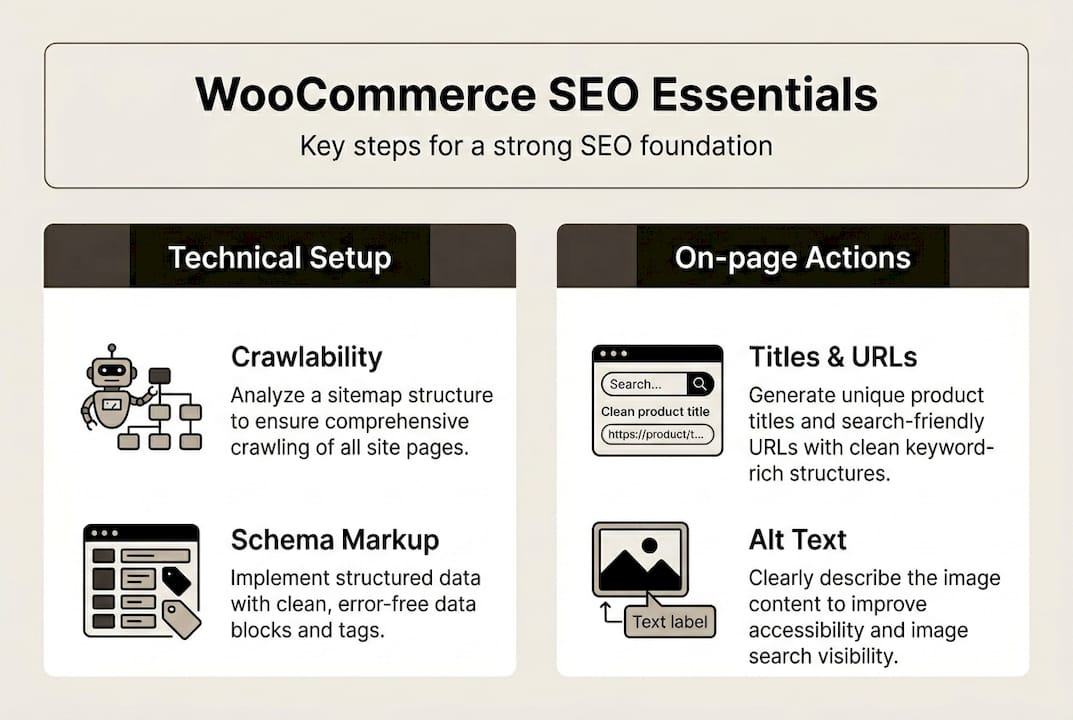
On-page optimisation for WooCommerce means crafting product titles, descriptions, URLs, and image alt text with relevant keywords. Product titles should be descriptive and include primary keywords naturally. URLs should be short and readable, avoiding auto-generated strings of numbers. Image optimisation includes descriptive filenames, alt text for accessibility and SEO, and compressed file sizes for faster loading. Consider partnering with specialists in WordPress web design to ensure your store’s technical setup supports these optimisation efforts.
Pro Tip: Run a crawl audit quarterly using Screaming Frog or similar tools to catch technical issues before they impact rankings. Set up automated alerts in Search Console for sudden drops in indexed pages or crawl errors.
Create and execute content strategies for high-intent WooCommerce keywords
Technical setup alone won’t drive sales. You need content strategies for buying guides and keyword research focusing on high-intent terms to attract purchase-ready visitors. High-intent keywords include phrases like “buy,” “best,” “review,” or specific product models. Long-tail keywords with three or more words typically have lower competition and higher conversion rates because they match specific customer needs.
Start by identifying keywords your target customers use when ready to purchase. Use tools like Google Keyword Planner, Ahrefs, or SEMrush to find search volume and competition data. Prioritise keywords with commercial intent over informational queries. For example, “best running shoes for flat feet” signals purchase intent, while “what causes flat feet” is purely informational.
Structure your site with a clear category hierarchy following the three-click rule. Customers should reach any product within three clicks from your homepage. This improves user experience and helps search engines understand your site’s structure. Organise categories logically by product type, use case, or customer segment. Avoid overly deep hierarchies that bury products under multiple layers of navigation.
Develop buying guides that address common customer questions and decision-making factors. These guides target informational keywords early in the buying journey and funnel readers toward your products. A guide on “how to choose running shoes” can rank for informational queries while naturally linking to your product categories. Include comparison tables, pros and cons lists, and clear calls to action directing readers to relevant products.
Internal linking distributes SEO value across your site and guides customers through their journey. Link from blog posts to category pages, from categories to products, and between related products. Use descriptive anchor text that includes relevant keywords naturally. Review your internal linking structure regularly to ensure orphaned pages receive links and important pages get sufficient link equity. Explore proven SEO strategies to refine your approach.
- Conduct keyword research to identify high-intent and long-tail opportunities.
- Map keywords to specific pages, ensuring each page targets a primary keyword.
- Create buying guides and content hubs around major product categories.
- Implement internal linking between content, categories, and products.
- Update content regularly to maintain relevance and freshness signals.
Pro Tip: Use AI tools to generate FAQ content optimised for featured snippets. Structure answers in 40-60 words with clear, direct responses to common questions. This increases your chances of appearing in position zero and voice search results.
| Content type | Primary keyword type | Conversion stage |
|---|---|---|
| Buying guides | Informational + commercial | Early to mid-funnel |
| Product pages | Transactional | Late funnel |
| Category pages | Commercial | Mid to late funnel |
| Blog posts | Informational | Early funnel |
Manage common WooCommerce SEO challenges and pitfalls
Even well-optimised stores face recurring SEO problems that can undermine rankings. Faceted navigation generates duplicate content and crawl budget waste through solutions including canonical tags, noindex filters, robots.txt blocks, and static landing pages. Faceted navigation allows customers to filter products by attributes like colour, size, price, or brand. Each filter combination can create a unique URL, generating thousands of low-value pages that dilute your site’s authority.
Control faceted navigation indexing by applying noindex tags to filtered URLs. Use your SEO plugin or custom code to detect filter parameters in URLs and add noindex meta tags automatically. For important filter combinations that deserve to rank, create static landing pages with unique content and proper optimisation. For example, instead of letting a filtered URL like “/shoes?colour=red&size=10” get indexed, create a dedicated page at “/red-shoes-size-10” with original content.
Robots.txt can block crawlers from accessing filter URLs entirely, but use this cautiously. Blocking in robots.txt prevents crawling but doesn’t prevent indexing if external links point to those URLs. Canonical tags are often a better solution, pointing filtered URLs back to the main category page. This consolidates ranking signals while still allowing customers to use filters.
Handling out-of-stock products requires a strategic approach to avoid negative SEO signals. Out-of-stock products can harm SEO if not managed through solutions including redirects and canonical tags. If a product is permanently discontinued, implement a 301 redirect to a similar product or relevant category page. For temporarily out-of-stock items, keep the page live with clear messaging about expected restock dates and offer alternatives or email notifications.
Canonical tags can point out-of-stock variations to in-stock versions of the same product. This preserves the SEO value of the original page while directing search engines to the available option. Avoid leaving out-of-stock pages as thin content with no value, as this creates a poor user experience and can trigger quality issues in search algorithms.
Use noindex tags strategically on low-value pages like cart, checkout, account pages, and thank-you pages. These pages serve functional purposes but shouldn’t appear in search results. Apply noindex to tag archives, author pages, and date-based archives if they don’t add unique value. Monitor your indexed pages in Search Console to catch unintended indexation. Learn more about SEO meta tags optimisation to refine your approach.
- Apply noindex to filtered URLs and low-value pages to protect crawl budget.
- Use 301 redirects for permanently discontinued products.
- Keep temporarily out-of-stock pages live with clear messaging and alternatives.
- Implement canonical tags to consolidate variations and avoid duplicate content.
- Monitor indexed pages quarterly to catch indexation issues early.
| Issue | Solution | Implementation |
|---|---|---|
| Faceted navigation duplicates | Noindex filters or canonical tags | SEO plugin or custom code |
| Out-of-stock products | 301 redirects or canonical tags | WooCommerce settings or plugin |
| Low-value pages indexed | Noindex tags | SEO plugin meta settings |
| Product variation duplicates | Canonical tags to primary variation | SEO plugin or theme code |
Monitor your WooCommerce SEO performance and align with Australian market needs
SEO is an ongoing process requiring regular measurement and adjustment. Track organic revenue and integrate local SEO with .com.au domains and ensure fast hosting in Australia using tools like Yoast and Screaming Frog. Set up Google Analytics 4 to track organic traffic, conversions, and revenue specifically from search engines. Create custom segments to isolate organic performance and compare it against other channels. Monitor metrics like organic sessions, conversion rate, average order value, and total revenue from organic search.
Google Search Console provides essential data on search performance, including impressions, clicks, average position, and click-through rates for specific queries and pages. Identify pages losing rankings or traffic to prioritise for optimisation. Track core web vitals to ensure your site meets Google’s performance standards. Set up Search Console alerts to catch sudden drops in indexed pages or increases in crawl errors.
For Australian WooCommerce stores, local SEO integration is crucial. Use a .com.au domain to signal geographic relevance to Australian searchers. Implement hreflang tags if you serve multiple regions to prevent duplicate content issues and ensure the correct version appears in each market. Create and optimise your Google Business Profile even if you’re primarily online, as this can improve local pack visibility for brand searches.
Site speed directly impacts both user experience and rankings. Australian stores should use hosting providers with servers located in Australia to minimise latency for local customers. Aim for page load times under three seconds on both desktop and mobile. Optimise images, enable caching, use a content delivery network, and minimise unnecessary plugins. Test speed regularly with Google PageSpeed Insights and address issues flagged in the recommendations. Consider working with a local SEO agency Melbourne to optimise for Australian search behaviour.
SEO plugins like Yoast, RankMath, or AIOSEO provide on-page optimisation tools, schema markup, XML sitemaps, and integration with Search Console. Choose one plugin and configure it properly rather than running multiple SEO plugins that can conflict. Use these tools for regular audits of title tags, meta descriptions, and content optimisation scores. Technical SEO tools like Screaming Frog, Ahrefs, or SEMrush help identify technical issues, track rankings, and analyse competitors.
- Set up Google Analytics 4 and Search Console to track organic performance metrics.
- Monitor organic revenue, conversion rate, and traffic trends over three to six months.
- Configure .com.au domain and implement hreflang for Australian targeting.
- Optimise site speed with Australian hosting and aim for sub-three-second load times.
- Use SEO plugins for on-page optimisation and conduct technical audits quarterly.
- Iterate strategies based on data to maximise growth and stay current with algorithm updates.
Enhance your WooCommerce SEO with expert help from Design Box Digital
Implementing comprehensive WooCommerce SEO requires technical expertise, ongoing monitoring, and strategic content development. Design Box Digital offers specialised SEO services tailored to WooCommerce stores, helping Australian businesses improve search rankings and drive measurable sales growth. Their team applies proven strategies to enhance SEO performance, addressing technical issues, content gaps, and local optimisation needs specific to the Australian market.
With over 20 years of experience in digital marketing and e-commerce, Design Box Digital understands the unique challenges WooCommerce store owners face. Partnering with a local SEO agency Melbourne ensures you avoid common pitfalls, accelerate your store’s growth, and maintain competitive advantage as search algorithms evolve. Their data-driven approach focuses on sustainable results, not quick fixes, helping you build long-term organic visibility and revenue.
What is WooCommerce SEO and why is it important?
WooCommerce SEO refers to optimising your WooCommerce online store to rank higher on search engines like Google. This involves technical setup, content strategy, and ongoing refinement to increase organic visibility. Higher rankings lead to more qualified traffic visiting your store, which directly translates to increased product discovery and sales. Without proper SEO, your products remain invisible to potential customers actively searching for what you sell, leaving revenue on the table.
How long does it take to see results from WooCommerce SEO efforts?
Expect three to six months for revenue impact from WooCommerce SEO after implementing comprehensive optimisation strategies. Search engines need time to crawl your changes, re-evaluate your site’s authority, and adjust rankings accordingly. Consistency and ongoing optimisation are essential for sustained growth. Early wins like improved crawlability and indexation may appear within weeks, but meaningful traffic and revenue increases typically emerge in the three to six month timeframe.
What are the best SEO plugins for WooCommerce in Australia?
Use Yoast, RankMath, or AIOSEO plugins for WooCommerce SEO optimisation in Australia. These plugins offer comprehensive features including on-page optimisation, schema markup, XML sitemaps, and Search Console integration. They support local SEO needs and work seamlessly with Australian hosting and site configurations. Choose one plugin based on your specific needs and budget, then configure it properly rather than running multiple SEO plugins that can create conflicts. All three integrate well with WordPress web design best practices.
How do I handle out-of-stock products for SEO?
Out-of-stock products can harm SEO if not managed properly through solutions including redirects and canonical tags. For permanently discontinued items, implement 301 redirects to similar products or relevant category pages to preserve link equity. For temporarily out-of-stock products, keep the page live with clear messaging about restock dates and offer alternatives or email notifications. This maintains the page’s SEO value while providing a positive user experience. Canonical tags can point out-of-stock variations to available versions of the same product, consolidating ranking signals.