


This is a Lite versus Pro guide to Duplicator, the WordPress backup and migration plugin. We build, host and migrate WordPress from Docklands. That is why we are writing it. It is not a claim that Design Box runs Duplicator on every site we ship. Duplicator is a trademark of Snap Creek LLC. Some of the links in this post go to duplicator.com: if you buy through these links we may earn a commission at no extra cost to you.
TL;DR
- Duplicator Lite is free on WordPress.org: 1M+ installs, 4.9 stars, PHP 7.4+, WordPress 5.3+, v1.5.17 (last updated late August 2026).
- Lite packages the site into an archive plus installer.php. Manual backups. Filters for files and tables. Database-only packages. Local storage on the same server.
- The Lite DupArchive cap is about 500MB — Duplicator’s own free vs Pro article. Restore is FTP or cPanel upload, then
https://new-domain/installer.php. The destination can be empty. WordPress does not need to be installed first. - Pro adds scheduled backups, cloud storage (including Duplicator Cloud), drag-and-drop import, a 2-step installer, server-to-server import by URL, 1-click restore, recovery points, AES-256, custom search-replace, managed-host support, multisite (Pro plan), staging, and a paid White Glove move.
- List prices in USD from their pricing page: Basic $79 / 2 sites, Plus $199 / 5 sites, Pro $399 / 20 sites, Elite $599 / 100 sites. Introductory first-year discounts exist; checkout currently teases savings. Renewals are at full list. GST is not on their USD prices. Check checkout.
- Lite is enough for a small, one-off Melbourne move. Pro is the licence when you want schedules, an offsite copy, or a network. A plugin is not hosting and not a rebuild. Our published cPanel floors are $20 / $44 / $60 / $184 per month. Website floors: landing from $1,100, business from $3,300, ecommerce from $7,000. GST is 10%.
What Duplicator actually is
Duplicator is a WordPress plugin that packages a site so you can back it up, clone it, or move it. Two products share the name. Lite is the free plugin on WordPress.org. Pro is the paid plugin sold on duplicator.com. Same job. Different amount of hand-holding.
The useful trick, which Duplicator itself publishes: Lite can land on an empty destination. You do not install WordPress on the new server first, then fight an importer. You upload the archive and installer.php, run the installer, and WordPress comes with the site. That is why agencies still reach for it on a Friday afternoon move.
It is still a plugin. It does not replace Australian hosting. It does not replace a care plan. It does not rewrite a theme that is already slow. If the site itself is the problem, that is a rebuild conversation, not a zip file.
What Duplicator Lite can do
This is the free plugin as listed on WordPress.org and as Duplicator describes it. We are not inventing extra buttons.
- Package the site into an archive plus
installer.php. - Manual backups. You click. It builds. Nothing runs on a schedule.
- Database-only packages, plus file and table filters so you can leave junk out of the archive.
- Archive engines: DupArchive, Zip, ZipArchive, and Shell Zip. DupArchive is Duplicator’s own format for larger builds. On Lite, Duplicator’s free-vs-pro article puts a cap of about 500MB on it.
- Restore / migrate: upload both files over FTP or cPanel into the destination root, then visit
https://new-domain/installer.php. The installer walks the database connection and URL rewrite. - Empty destination is fine. WordPress does not need to be installed on the new server first.
- Local storage on the same server as the site. Lite does not push copies to Dropbox, S3, or Duplicator Cloud.
Requirements published on the WordPress.org listing at time of writing: PHP 7.4+, WordPress 5.3+, version 1.5.17, last updated late August 2026. 1M+ active installs, 4.9 stars. Those numbers move; check the listing if you are buying on a later date.
Lite is a competent one-off mover. It is not a backup policy. A copy sitting next to the live site is lost in the same disk failure as the live site. That is the line where Pro starts to earn its keep.
How a Lite move works
Four steps. This is the classic installer path Duplicator documents for Lite — not the Pro drag-and-drop importer.
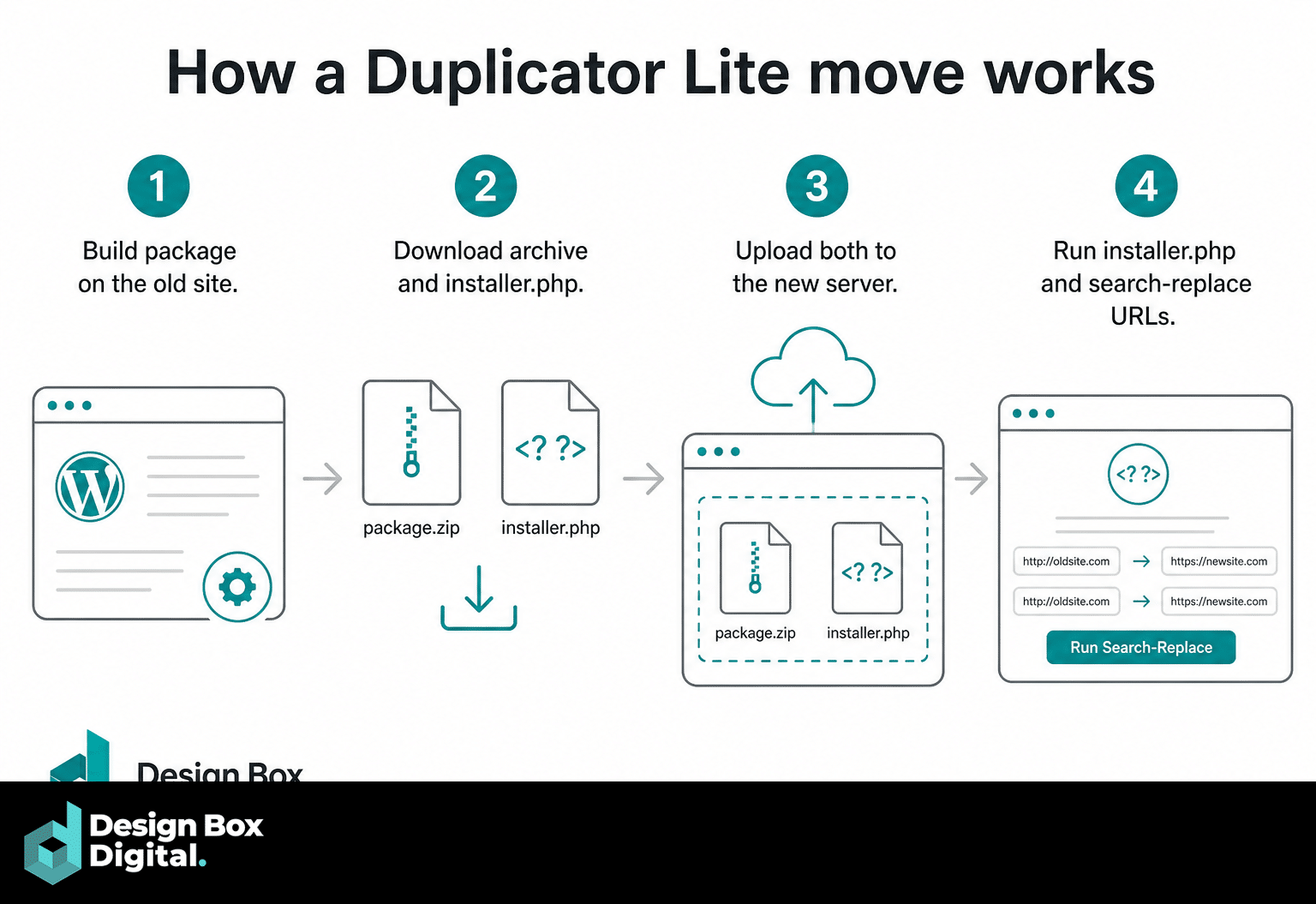
- Build the package on the old site. In wp-admin, open Duplicator, create a new package, set file and table filters if you need them, and let it build. You get two files: the archive (zip or DupArchive) and
installer.php. - Download the archive and installer.php. Take both off the old server. Keep them together. The installer is paired to that archive.
- Upload both to the new server. FTP, SFTP, or cPanel File Manager, into the web root of the new domain (or the subdirectory you actually want). Empty folder is fine. You do not install WordPress first.
- Run installer.php and search-replace URLs. Visit
https://new-domain/installer.php. Point it at the new database, let it unpack, and let it rewrite old URLs to the new domain. Delete installer files when it tells you to. Then check permalinks, Search Console, and a handful of internal links before you touch DNS.
That is the whole Lite dance. Miss the search-replace and you migrate a site that still points at the old host. Miss the installer cleanup and you leave a PHP script sitting in the web root. Neither is clever.
Lite vs Pro
Lite is manual, local, and capped. Pro is scheduled, offsite, and built for sites that will not fit in a 500MB DupArchive. Duplicator publishes the split on its free vs Pro and features pages. The table below is that split, not a Design Box lab sheet.
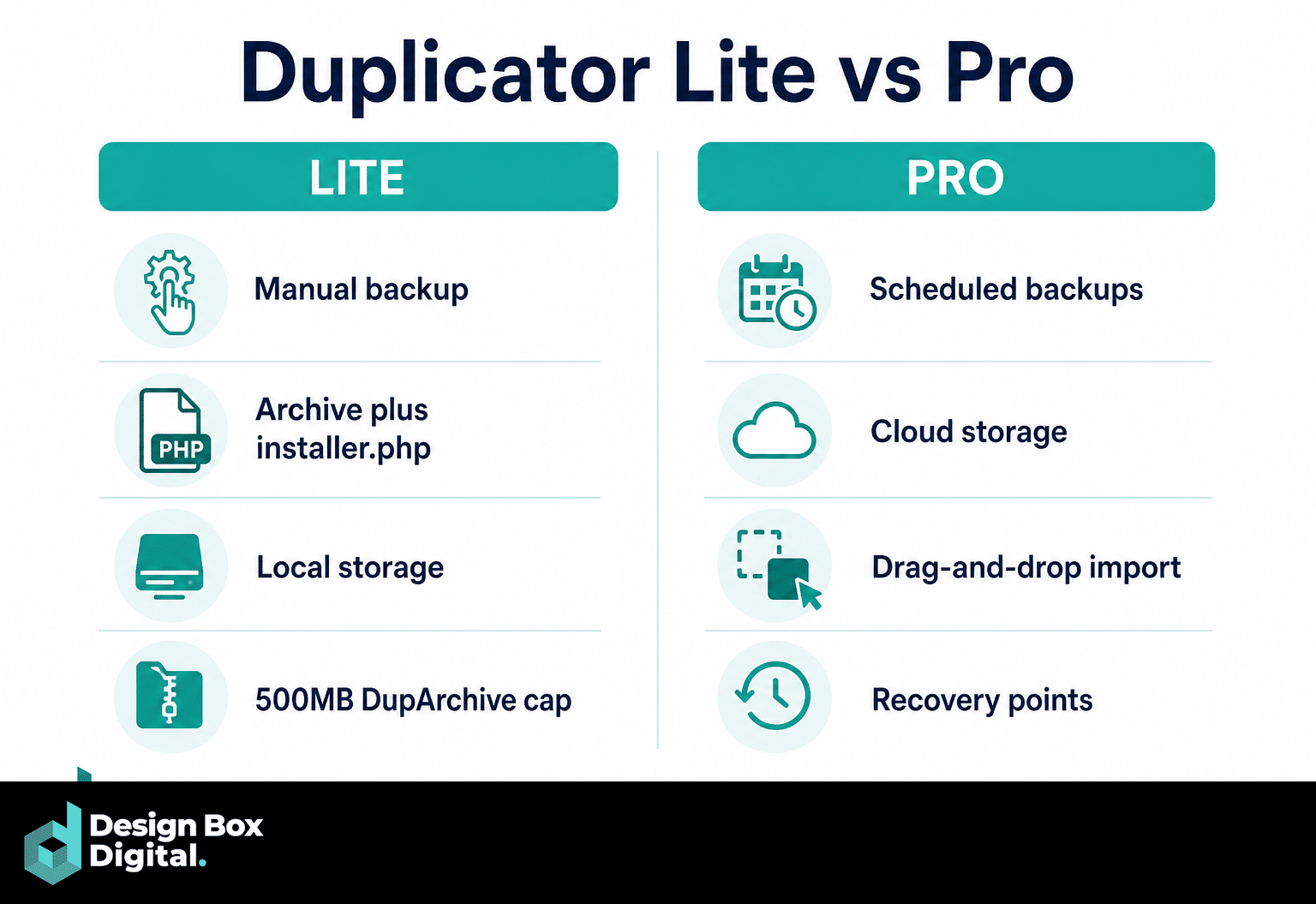
| Function | Lite | Pro |
|---|---|---|
| Cost | Free on WordPress.org | USD list: $79 / $199 / $399 / $599 per year (see pricing). GST not included. |
| Sites per licence | Unlimited use of the free plugin | Basic 2 · Plus 5 · Pro 20 · Elite 100 |
| Package | Archive + installer.php | Same, plus drag-and-drop and URL import |
| Backups | Manual only | Scheduled. Hourly starts at Plus and above |
| Storage | Local, same server | Local plus cloud (1 destination on Basic; unlimited from Plus) |
| DupArchive cap | About 500MB (their free-vs-pro article) | Cap removed. They cite 100GB (features) and up to 400GB (free-vs-pro) |
| Archive engines | DupArchive / Zip / ZipArchive / Shell Zip | Same engines, without the Lite size cap |
| Filters | Database-only, file and table filters | Those, plus custom types and media-only (Pro plan) |
| Empty destination | Yes — WordPress need not be installed | Yes, plus import into an existing WordPress install |
| Import | FTP/cPanel + installer.php | Drag-and-drop, 2-step installer, server-to-server by URL |
| Restore | Re-upload and run the installer | 1-click restore from the backups screen, including from cloud |
| Recovery points | No | Yes — Duplicator describes restore even if wp-admin is down, from a full local backup |
| Encryption | No AES-256 on the package | AES-256 / password on installer and/or archive |
| Search-replace / shared DB / managed hosts | Installer URL rewrite on migrate | Custom search-replace, shared-database support, WordPress.com Business, WP Engine, GoDaddy Managed, Liquid Web Managed |
| Multisite | No full network tooling | Full network, subsite → standalone and reverse — starts at the Pro plan ($399 list), not Basic or Plus |
| Staging | No | Staging sites on the Pro plan |
| Installer extras | Classic installer | Branding, migrate Duplicator settings, regenerate SALTS (Plus and above); cPanel API in the installer |
| Developer | — | Advanced permissions, email notifications, developer hooks |
| WooCommerce | A WordPress site is a WordPress site | They market WooCommerce backups. We have not lab-tested that claim here. |
| White Glove | No | From $149 USD, Pro subscription required, one site per purchase |
| Bundled extras | None | WP Media Cleanup + DB Optimizer on Pro and Elite (or $29/yr standalone). Activity Log on Elite only (or $29/yr). |
What Duplicator Pro actually adds
Everything below is from Duplicator’s own features, pricing and free vs Pro pages. Treat it as vendor copy we have organised, not a Docklands bench test.
Scheduled backups
Pro can run backups on a schedule so you are not relying on someone remembering Friday. Hourly schedules start at Plus and above. Basic still gets scheduled backups; it does not get the hourly cadence Duplicator flags on Plus. You can point different schedules at different parts of the site — database more often than uploads — which is how you stop paying to zip the same media library every hour.
Cloud storage
Lite keeps the archive on the same disk as the site. Pro can send copies offsite. Destinations Duplicator lists: Dropbox, Google Drive, OneDrive, Amazon S3, FTP/SFTP, Wasabi, Google Cloud Storage, DreamObjects, Vultr, DigitalOcean Spaces, Cloudflare R2, Backblaze B2, Linode, other S3-compatible stores, plus Duplicator Cloud.
Basic: one cloud destination. Plus and above: unlimited destinations. That is the 3-2-1 idea they publish — three copies, two media types, one offsite — not a slogan we invented.
Duplicator Cloud is their own bucket, billed in USD per year on top of the plugin licence:
| Duplicator Cloud plan | Storage | USD / year |
|---|---|---|
| Starter | 2GB | $29 |
| Basic | 10GB | $49 |
| Plus | 25GB | $69 |
| Business | 50GB | $99 |
| Pro | 100GB | $149 |
| Scale | 150GB | $199 |
A 50GB WooCommerce uploads folder will not fit on Starter. Do the arithmetic before you tick the box. GST is not on these USD figures either.
Import, restore and recovery points
Pro’s migration path is shorter than Lite’s FTP dance:
- Drag-and-drop import of the archive into an existing WordPress install that already has Pro.
- A 2-step installer Duplicator markets as the fast path.
- Server-to-server import by URL — point the destination at the archive without parking a multi-gig zip on your laptop.
- 1-click restore from the backups screen, including downloads from cloud storage.
- Recovery points / disaster recovery. Duplicator’s own description: set a full backup stored locally as the recovery point, keep the recovery link, and restore even if wp-admin is down. That is their claim. It still requires that local full backup to exist before the disaster, which is the part people skip.
Encryption
Pro can put AES-256 on the installer, the archive, or both, with a password. Useful when the package is sitting in object storage or in an inbox. Useless if the password is “password” and the link is in the same email.
Search-replace, shared databases, managed hosts
Pro adds custom search-replace beyond the default URL rewrite, shared database support (two WordPress installs sharing one database), and support Duplicator lists for WordPress.com Business, WP Engine, GoDaddy Managed, and Liquid Web Managed. Managed hosts are fussy about how you write files. That list is why people buy Pro for a WP Engine move instead of fighting Lite’s installer on a host that will not let you drop installer.php in the root.
Multisite
Full network backup, subsite → standalone, and the reverse. This starts at the Pro plan ($399 list). Basic and Plus do not include it. If you run a network and you only budgeted for Basic, you bought the wrong licence.
Staging
Staging sites are a Pro-plan feature. Duplicator’s listing describes creating a staging copy from the dashboard to test updates before they hit production. That is their product copy. A staging slot on the same cheap hosting plan as production is still the same disk and the same PHP — do not treat it as a second data centre.
Custom backups
Custom backup types and media-only backups start at the Pro plan. Lite already does database-only and file/table filters. Pro is the extra granularity: skip core, skip inactive themes, take uploads on their own schedule.
Installer branding, SALTS, cPanel API, developer hooks
From Plus and above: installer branding, migrate Duplicator settings with the site, and regenerate SALTS so the copied site does not keep the old cryptographic salts. Across Pro: advanced permissions, email notifications when a backup fails, developer hooks, and a cPanel API inside the installer so it can create the database and user instead of you doing it in cPanel first. Pre-configured starter / template installs are on the features list — package a “house” theme-and-plugin stack and reuse it. That is a time saver for anyone spinning up many WordPress sites. It is not a design system.
WooCommerce
Duplicator markets WooCommerce backups. A Woo store is a WordPress site with extra tables and a uploads folder that grows without asking. The plugin will package what WordPress will package. We are not claiming a Design Box lab run against checkout, subscriptions, or a 40GB product-image library. If you sell on Woo, read Shopify vs WooCommerce for the platform choice; use Duplicator (or anything else) as the copy tool, not the merchandising strategy.
How large a site they say it handles
Two published claims, both theirs:
- The features page says a confirmed 100GB migration.
- The free vs Pro article says Pro removes the 500MB cap and cites migrations as large as 400GB.
Those are vendor figures. They are not a Design Box lab result. A 400GB archive still has to travel, unpack, and sit on a disk that is large enough. Hosting limits, PHP timeouts and inode caps will stop you before the plugin’s marketing page will.
White Glove migration
Duplicator sells a professional / White Glove migration service from $149 USD. A Pro subscription is required. They say about three business days once the details are in. One site per purchase. It is their team, not ours. If you want Docklands to move the site, that is a different invoice.
Bundled extras
Duplicator also sells adjacent plugins and bundles some of them:
- WP Media Cleanup and DB Optimizer — included on the Pro and Elite plans, or $29/year standalone on their marketing.
- Activity Log — Elite only, or $29/year on its own.
Those extras are not Lite. They are also not a substitute for watching the error log on a live Woo store.
Pricing (USD list, not a sale lock)
Figures below are the “Normally” list prices on duplicator.com/pricing at time of writing. Checkout currently teases first-year savings. Duplicator’s own free-vs-pro article has used $69.30 as a sale starting figure. We are not locking a discount percentage into this post. Renewals are at full list. 14-day money-back. All of it is USD. GST is not on their USD prices — say so to your bookkeeper, then check the checkout screen before you pay.
| Plan | List (USD / year) | Sites | Cloud destinations | What that plan is for |
|---|---|---|---|---|
| Basic | $79 | 2 | 1 | Scheduled backups, 1-click restore, encryption, drag-and-drop, server-to-server import. No hourly. No multisite. |
| Plus | $199 | 5 | Unlimited | Hourly backups, installer branding, migrate Duplicator settings, regenerate SALTS. |
| Pro | $399 | 20 | Unlimited | Staging, multisite, custom / media-only backups, advanced permissions, WP Media Cleanup, DB Optimizer. |
| Elite | $599 | 100 | Unlimited | Everything in Pro, plus Activity Log. |
Duplicator Cloud storage is extra (table above). White Glove is extra. Convert USD at the card rate on the day you buy; we are not publishing an AUD sticker that will be wrong next week.
When Lite is enough vs when Pro is worth it (Melbourne WordPress)
A five-page brochure site on our Australian cPanel at $20 / $44 / $60 / $184 per month can live on Lite if someone actually clicks “build package” before a risky update, and downloads the two files off the server. Local-only is still a single point of failure. For a site that takes enquiries, offsite is the grown-up version of the same habit.
Lite is enough when:
- The site is small — well under the ~500MB DupArchive cap after you exclude caches and backups-of-backups.
- You are doing a one-off move to a new host or domain, and you are willing to FTP two files.
- You do not need schedules, cloud, multisite, or a recovery link for when wp-admin is dead.
Pro is the better spend when:
- You want backups that run without a human. Hourly wants Plus.
- You want a copy that survives the same disk as production.
- The site is a Woo store, a media-heavy brochure, or anything that laughs at 500MB.
- You run multisite (Pro plan, not Basic).
- The destination is a managed host on Duplicator’s list.
- You would rather drag-and-drop than babysit
installer.phpon a phone at 11pm.
None of that is a website quote. Our published floors remain landing from $1,100, business WordPress from $3,300, ecommerce from $7,000. GST is 10%. A $79 USD plugin licence does not turn a broken theme into a business site. SEO retainers typically sit at $1,500–$5,000+/month and are a different line again. If the move is really “this WordPress install is the problem,” budget the rebuild, not another archive format.
We will migrate WordPress when that is the job. We will not pretend a plugin invoice replaces hosting, updates, or a team that answers the phone in Docklands.
FAQ
Is Duplicator Lite enough to move a WordPress site?
Yes, for a small site, as a one-off. Build the package, download archive plus installer.php, upload both to the new server, run the installer, search-replace URLs. Stay under the Lite DupArchive cap of about 500MB. If you need schedules, cloud, or a network, that is Pro.
What is the 500MB cap?
Duplicator’s free-vs-pro article says Lite’s DupArchive format is limited to about 500MB. Pro removes that cap. Their features page cites a confirmed 100GB migration; the free-vs-pro article cites migrations as large as 400GB. Those are Duplicator’s figures, not a test we ran in Docklands.
Does Duplicator work if WordPress is not installed on the new server?
Yes. Lite is built for an empty destination. Upload the two files and run https://new-domain/installer.php. You do not need a fresh WordPress install waiting. Pro can also import into an existing WordPress site with drag-and-drop or a URL.
Do I need Pro for multisite?
Yes for the real network tools: full network, subsite to standalone, and the reverse. Duplicator starts that at the Pro plan ($399 list). Basic and Plus do not include it.
How much is Duplicator Pro?
List in USD: Basic $79 (2 sites), Plus $199 (5), Pro $399 (20), Elite $599 (100). Introductory first-year discounts exist; check checkout rather than this paragraph. Renewals are full list. 14-day money-back. GST is not baked into their USD prices. Duplicator Cloud and White Glove (from $149 USD) are extra.
Is this an affiliate post?
Yes. Links to duplicator.com in this article use our affiliate ID. If you buy through them we may earn a commission at no extra cost to you. The WordPress.org Lite listing is not an affiliate link. We still have to describe the product honestly under the ACCC rules that apply to that disclosure — which is why the 500MB cap, the plan limits, and the “we did not lab-test Woo” lines are in here.
Will Duplicator replace hosting and maintenance?
No. It copies a WordPress site. It does not patch PHP, it does not pay the data-centre bill, and it does not fix a theme that fails INP. Our Australian cPanel plans are $20 / $44 / $60 / $184 per month. Maintenance is a separate habit. If the site needs to be rebuilt, the floors are on our web design page.
Talk to Docklands
If you want a Melbourne team to move, host or rebuild WordPress — with or without this plugin in the mix — call 03 9067 5679 or 1300 322 971, or use the contact form. Tell us the domain, the host you are leaving, and whether this is a copy, a care plan, or a new site. We will tell you which.
Design Box Digital, Level 10, 611 Flinders Street, Docklands. Custom WordPress. In-house. No #1 guarantee, and no claim that a zip file is a strategy.